Game Design Ideas Articles Hexagonal Grid Math
Game Design Articles to ADD to wiki as reference, expanding ideas and forming a Game Build Plan.
Contents
Hexagonal Grid Math
Uniform hexagonal grid is a recurring pattern in computer games and graphics applications.
There are few operations one might need to perform:
- finding hexagon's position by its index in the grid;
- picking a hexagon by mouse;
- finding neighbor cells;
- finding hexagon's corner coordinates etc.
While these things do not appear hard at all (something like primary school-level geometry/arithmetics), it's not as straightforward as with a rectangular grid, hovewer.
Having tried to consult with internets I've found a neat article on CodeProject, which was solving exactly the problems mentioned. It's considerably highy rated, which I guess means that this stuff is indeed in demand.
What have confused me, though, is that presented solution (and code) seemed to be more complex than one could expect:
- hexagon positions are found iteratively, based on the previously computed positions;
- a bunch of corner cases are treated in the process;
- a whole lot of state is stored for each hexagon;
- there is a separate codepath for the alternative hexagon orientation mode (aka "pointy" orientation), which interwines with the main one;
- to pick a hexagon by mouse, the code iterates on the array of hexagons, and performs generic "point-in-polygon" test for each, using stored corners' coordinates.
Can we do any simpler?..
Hexagonal grid properties
Let's examine the geometric properties of a hexagon and define some constants:
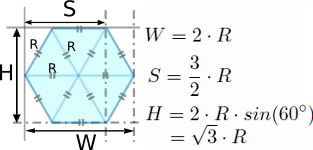
We define the hexagon by its radius R, and find some other parameters based on it, such as W ("width"), S ("side") and H ("height").
Now, let's examine the hexagonal grid itself:
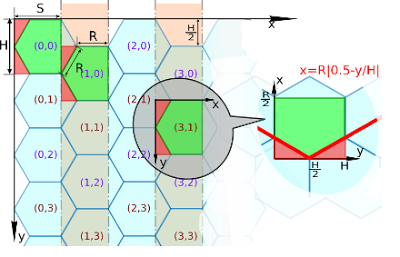
Finding hexagon position by its array index
From that picture one can figure out the formula for finding position of the top left corner of a hexagon cell by its array index (i, j):
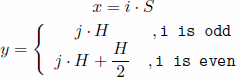
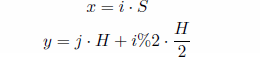
Taking into account that for odd columns i%2 (remainder from division of i by 2) equals 1, and for even columns it equals 0, we can rewrite it:
Finding hexagon index by a point
Another operation is to find the hexagon array index from a point coordinates on the screen, which is used for mouse picking.
Let's start from the observation that hexagonal grid can be completely covered by the set of rectangular tiles (of width S and height H). They are drawn as green rectangles with purple triangular insets in the picture above. Each tile overlaps with three hexagons.
Finding which of those tiles our picking point gets into is not too hard:
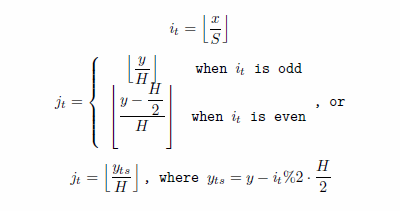
Here (it, jt) are the column/row of the rectangular tile picked by the point. Those fancy brackets is a floor operation.
Coordinates of the point inside the tile are:
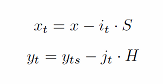
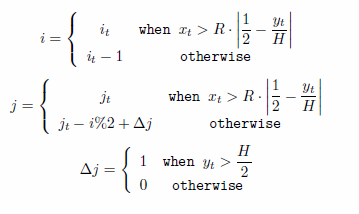
After we have all this, now we can find which one of the three possible hexagons corresponds to our point. For that we zoom into the rectangular cell's coordinate system and build a plot of the separating line (the fat red line in the picture). Its function is xt=R|0.5-yt/H|, and for all the points above the line (they fall into the green area) we have that xt>R|0.5-yt/H|.
For all the other points inside the rectangle, we have to pick either top or bottom hexagon to the left. This is decided based on value of yt.
Additionally, we have to mind the odd/even rows indexing difference (as rows in the hexagon array go in zigzag pattern).
Putting it all together, the final array indices of the picked hexagon are:
The "pointy" grid orientation
So far we've been only considering the "flat" grid orientation (i.e. hexagons are "lying" on their sides).
What happens if we want to have the alternative orientation, when hexagons are oriented corners upwards, should we rewrite all the formulas?..
One simple observation about the "pointy" orientation is that one can get it by mirroring the "flat" one around the diagonal axis.
The direct consequence of this is that all the calculations for the "pointy" case can be performed by:
- swapping the input coordinates (i.e. "mirror" them around the diagonal): x<->y or i<->j;
- applying the formulas as described above;
- swapping the output coordinates back ("unmirroring" them): i<->j, x<->y.
The operation is quite straightforward to do in code (as opposed to having a separate codepath for each case), I am leaving it as an exercise to the reader.
The code
Here's an example Java code, which has the formulas implemented:
CODE
Testing the code
To test the code I've written a small Java applet.
It's a hexagonal version of the game called "Lights Out" (the idea of which I've borrowed from here).
One starts the game with all the "lights" on (all the hexagons are yellow), and the goal is to switch all of them off (so all the hexagons become gray).
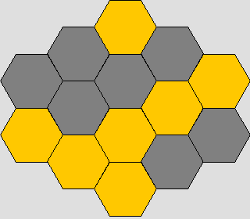
Whenever user clicks on a hexagon, it toggles its light, together with all the neighbor hexagons.
CODE
The source is also available on github.
The applet in action can be seen here (all the usual java applet related disclaimers apply).
UPDATE: Ferris Thomas made an ActionScript 3 port of the code, kudos for that!
Additional thanks to Ruurd for spotting typos in the formulas.
