Game Design Ideas Articles Hexagonal Grid for games
Game Design Articles to ADD to wiki as reference, expanding ideas and forming a Game Build Plan.
Colour: A
Code: A
Contents
Hexagonal grid for games and other projects - Part 1
First version of a hexagonal grid for games or other apps.
Jeff Modzel, 26 Jul 2006

Introduction
The goal of my project is to create a modular, reusable hexagon based map that could be used in simple games and ALife applications. I wanted to leverage as much functionality as possible from .NET, which meant using GDI+ and Forms. Drawing shapes with GDI+ and capturing mouse events with Forms is fairly trivial, which would allow me to spend my programming time solving on more important issues (like hexagon geometry!). This is the first "version" of the hex map, and by no means complete.
Hexagon
Hexagon based games, whether traditional board games or computer-based, provide more strategic and tactical game-play when compared to simple square based games (like the Checkers game board). The hexagon has six sides, which allows movement in six directions, instead of four. The distance from the center of a hexagon to the center of each neighboring hexagon is equal, which eliminates the distortion of calculating diagonal distance in a traditional square based map. Hexagons are more pleasing to look at, which counts for something, right?
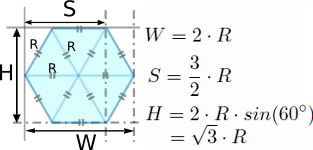
The core of my code is based on the geometry of the hexagon. When I use the word hexagon, I really mean regular hexagon, which is a six-sided polygon where all six sides have the same length. The beauty of the hexagon based map is that you really only need to know one thing: the length of a side of a hexagon. After that, you can calculate everything else you need to know.

If you know the length of side s, then you can calculate r and h. The values for a and b are pretty much irrelevant because you can calculate them from s, r, and h, and you don't really need a and b for any calculations anyway. So, how do you find r and h?
CODE
h = sin( 30°) * s
r = cos( 30°) * s
b = s + 2 * h
a = 2 * r
/CODE
My namespace is Hexagonal
AA


Pulling it all together in a Form
AA
Conclusion
AA
License
AA
About the Author
AA
