Templates
Making a comprehensive list of List of Templates and the various components in relation to them.
Note: ADD proper names and cross-internal links.
Note: ADD list of "special" details to add the various details for extras, ie. saltmarshes of Vashel, under Tamsen Forest.
Note: Text Highlight and Background Colour: Kandáy, Réthem, Thârda, Káldôr, Mèlderýn, Chybísa, Orbáal, Ázadmêre, Eváel.
Note: Green = I Have, Red = Don't Have, Orange = Old Scan, Blue = Misc, Black = ALL Base (Template)
Note: Colour Highlights: Yellow
Colour LINK Text: Possible Link NAME
Note: Hidden comments <!-- TEXT HERE WILL NOT BE DISPLAYED -->
Note: Anchor Points - Section linking WITHIN pages USE [[Help:Section#Section_linking|Section linking]] or To link to a section in the same page you can use [[#section name|displayed text]], and to link to a section in another page [[page name#section name|displayed text]].
Note: Section linking with arbitrary id USE <span id="anchor_name"></span>. Be sure to use a name that is not likely to be duplicated. One way to do this is to incorporate the titles of the higher-level sections, at least in abbreviated form, e.g., Ontario-Natural_features for the "Natural features" subsection of the "Ontario" section of an article about the provinces of Canada.
ADD inside Table Caption/Heaer Text
Contents
- 1 Templates
- 1.1 Anchors
- 1.2 Colours
- 1.2.1 Basic Colour Table
- 1.2.2 LinkTag RGB Colour Table
- 1.2.3 MediaWiki Link Colors
- 1.2.4 Language Families
- 1.2.5 Venârivè Map Key
- 1.2.6 A
- 1.2.7 A
- 1.2.8 A
- 1.2.9 A
- 1.2.10 Standard Kèthîra Table Colours
- 1.2.11 Hues as per Colour
- 1.2.12 ColorBrewer
- 1.2.13 Color Blender Tool
- 1.2.14 Cohesive Colors
- 1.2.15 Basic color schemes
- 1.2.16 ColorImpact
- 1.2.17 216 web-safe colors
- 1.2.18 X11 color names
- 1.2.19 HTML Symbol Codes - Table of Character Entity References
- 1.2.20 A
- 1.2.21 A
- 1.2.22 Ideas
- 1.2.23 A
- 1.3 Template Tests & Code Examples
- 1.4 List of Templates
- 1.5 New To Make
- 2 A
- 3 A
- 4 A
- 5 A
- 6 Notes
Templates
Replace “ ” with "
Replace ‘ ’ with '
Possible Link
INSERT TABLE
Anchors
See: Template:Anchor
Setting Anchors
Note: Generic anchor: some text. For a hidden anchor, omit the "some text".
Manual Anchors
Set your anchor anywhere in the page by using Template:Anchor
Referencing Anchors
Inside a regular wiki link Anchor Link HERE, include the hash sign (#) and the header name or the id tag name as you have written it.
Links of the form #Template_Anchor will link to the first anchor on the page matching that "anchor_name", usually the first identical section heading.
Anchors IDEA
Note: IDEA: Using <span id="anchor_name">Anchor Point Text</span> could setup <span id="COL_REF#_Article_Page#_SectionName">named Anchors</span> where Linked Anchors are composed of it's Name Parts;
- COL = Columbia Games (Fanon = FAN, etc.)
- REF#" = Product Code
- Article = Name of Article/Book
- Page# = Page #
- SectionName = The Chapter or referenced section.
- Page# = Page #
- Article = Name of Article/Book
- REF#" = Product Code
Clade IDEA
Note: IDEA: Using a Clade Template
Categories IDEA
Note: IDEA: Categories are added to a Whole Page, whereas we only need to link to a Category Index. We could create a Category, list all the various parts for a TimeLine within that Category, and put a link for each Date, Settlement, etc. to that Category List. ie. Create a Page for the Main Index, hence creating the Category Index required, then inside their add a table of all the entries for that given Date, Settlement etc. until the Articles and so on are seperated.
Then a Lists of years by topic can be created for each list.
See: Help:Categories
Note: IDEA: Using <span id="anchor_name">Anchor Point Text</span> could setup <span id="COL_REF#_Article_Page#_SectionName">named Anchors</span> where Linked Anchors are composed of it's Name Parts, see above
- List of millennia ~ 1,000 years
- List of centuries ~ 100 years
- List of decades ~ 10 years
- List of years ~ single years
- List of decades ~ 10 years
- List of centuries ~ 100 years
- Saeculum ~ Period of a persons life
- List of time periods ~ Various Types of Periods
Millennium
Viewpoint 1: X001–Y000
| 2 BC | 1 BC | 1 AD | 2 | 3 | 4 | 5 | ... | 998 | 999 | 1000 | 1001 | 1002 | 1003 | ... | 1998 | 1999 | 2000 | 2001 | 2002 | 2003 | ... | 2998 | 2999 | 3000 | 3001 | 3002 | 3003 | ... |
| First one thousand years (millennium) | Second millennium | Third millennium | Fourth millennium | |||||||||||||||||||||||||
Viewpoint 2: X000–X999
| 1 BC | 1 AD | 2 | 3 | 4 | 5 | ... | 998 | 999 | 1000 | 1001 | 1002 | ... | 1998 | 1999 | 2000 | 2001 | 2002 | ... | 2998 | 2999 | 3000 | 3001 | 3002 |
| First millennium | Second millennium | Third millennium | Fourth millennium | ||||||||||||||||||||
Century
Viewpoint 1: Strict usage
| 2 BC | 1 BC | 1 | 2 | 3 | 4 | 5 | ... | 96 | 97 | 98 | 99 | 100 | 101 | 102 | 103 | ... | 198 | 199 | 200 | ... | 1901 | 1902 | ... | 1998 | 1999 | 2000 | 2001 | 2002 | 2003 | ... | 2098 | 2099 | 2100 | 2101 | 2102 | 2103 | ... | 2198 | 2199 | 2200 | |||
| 1st century | 2nd century | ... | 20th century | 21st century | 22nd century | ||||||||||||||||||||||||||||||||||||||
Viewpoint 2: General usage
| 2 BC | 1 BC | 1 | 2 | 3 | 4 | 5 | ... | 96 | 97 | 98 | 99 | 100 | 101 | 102 | 103 | ... | 198 | 199 | ... | 1900 | 1901 | 1902 | ... | 1998 | 1999 | 2000 | 2001 | 2002 | 2003 | ... | 2098 | 2099 | 2100 | 2101 | 2102 | 2103 | ... | 2198 | 2199 |
| 1st century | 2nd century | ... | 20th century | 21st century | 22nd century | ||||||||||||||||||||||||||||||||||
A
A
A
Linking to a category
[[:Category:Help|Help category]]
Anchors TAGs IDEA
Tags would then use Anchors when referenced through the books and interlink the areas together.
Maybe the links on Dates would jump to the Timeline?
Colours should be used on Text as well as the background colours to reflect the TYPE of category it's under, Settlement, Person, and so on
Colours
Note: ADD a range of colours using the following template ideas;
Basic Colour Table
| Color | HTML / CSS Name | Hex Code #RRGGBB | RGB | Notes |
|---|---|---|---|---|
| Red | #FF0000 | (255, 0, 0) | Primary | |
| Orange | #FF8000 | (255,128,0) | Tertiary | |
| Yellow | #FFFF00 | (255, 255, 0) | Secondary | |
| Chartreuse | #80FF00 | (128, 255, 0) | Tertiary | |
| Lime | #00FF00 | (0, 255, 0) | Primary | |
| Spring Green | #00FF7F | (0, 255, 127) | Tertiary | |
| Cyan / Aqua | #00FFFF | (0, 255, 255) | Secondary | |
| Azure | #007FFF | (0, 127, 255) | Tertiary | |
| Blue | #0000FF | (0, 0, 255) | Primary | |
| Violet or Purple (Electric Indigo) | #8000FF | (128, 0, 255) | Tertiary | |
| Magenta / Fuchsia | #FF00FF | (255, 0, 255) | Secondary | |
| Rose | #FF007F | (255, 0, 128) | Tertiary | |
| Black | #000000 | (0,0,0) | ||
| White | #FFFFFF | (255,255,255) |
- Next between ? & ? are: Primary, Secondary, Tertiary, Quaternary, and Quinary
- Primary
- Secondary
- Tertiary
- Quaternary
- Quinary
- Quaternary
- Tertiary
- Secondary
Quaternary CMY:
- yellow
- amber
- orange
- vermilion
- yellow
- red
- crimson
- rose
- cerise
- magenta
- purple
- violet
- ultramarine
- blue
- cerulean
- azure
- capri
- cyan
- aquamarine
- spring green
- erin
- green
- harlequin
- chartreuse
- lime
- yellow
quaternary-color
|
{| |+'''RYB colors produced by mixing equal amounts of secondary and subsequent colors''' | {| |{{Color sample|#FEFE33|yellow}} |- |{{Color sample|#FF8000|'''orange'''}} |- |{{Color sample|#FE2712|red}} |- |{{Color sample|#800080|'''purple'''}} |- |{{Color sample|#0247FE|blue}} |- |{{Color sample|#66B032|'''green'''}} |- |{{Color sample|#FEFE33|yellow}} |} | {| |{{Color sample|#FF8000|orange}} |- |{{Color sample|#E37D6E|'''russet'''}} |- |{{Color sample|#800080|purple}} |- |{{Color sample|#989B9D|'''slate'''}} |- |{{Color sample|#66B032|green}} |- |{{Color sample|#DDD06A|'''citron'''}} |- |{{Color sample|#FF8000|orange}} |} | {| |{{Color sample|#E37D6E|russet}} |- |{{Color sample|#C2938D|'''plum'''}} |- |{{Color sample|#989B9D|slate}} |- |{{Color sample|#BCB88A|'''sage'''}} |- |{{Color sample|#DDD06A|citron}} |- |{{Color sample|#E0AB76|'''buff'''}} |- |{{Color sample|#E37D6E|russet}} |} LinkTag RGB Colour TableNote: ADD a selection of colours for each type, ie. Date, Place Name, Region Name, etc.
MediaWiki Link ColorsINSERT TABLE
Language FamiliesINSERT TABLE from Kèthîra Language Families
Venârivè Map KeyINSERT TABLE
AINSERT TABLE
AINSERT TABLE
AINSERT TABLE
AINSERT TABLE
Standard Kèthîra Table ColoursData Tables
Alternative Data Tables
Hues as per Colour
ADD ACTUAL names rather than plain English.
Colour Sample TemplateNote: USE COLOUR Template and SETUP a subtemplate for each Tribe, Language, Dialect Group, Settlement, etc. Can then Invoke the template/name to use Background and text colour. {{Color sample|#00FF00|description=green}}
ColorBrewerColorBrewer: Color Advice for Maps Number of data classesChoosing the number of data classes (3 to 12) is an important part of map design. Increasing the number of data classes will result in a more "information rich" map by decreasing the amount of data generalization. However, too many data classes may overwhelm the map reader with information and distract them from seeing general trends in the distribution. In addition, a large numbers of classes may compromise map legibility—more classes require more colors that become increasingly difficult to tell apart. Many cartographers advise that you use five to seven classes for a choropleth map. Isoline maps, or choropleth maps with very regular spatial patterns, can safely use more data classes because similar colors are seen next to each other, making them easier to distinguish. Nature of your data1. Sequential schemes (9 Colours) are suited to ordered data that progress from low to high. Lightness steps dominate the look of these schemes, with light colors for low data values to dark colors for high data values.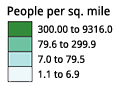
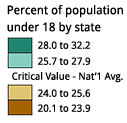  NOTE: Although we have designed the diverging schemes to be symmetrical, you may need to customize schemes by moving the critical break/class closer to one end of the sequence to suit your map data. For example, a map of population change might have two classes of population loss and five classes of growth, requiring a scheme with only two colors on one side of a zero-change break and five on the other. Choose a scheme with ten-colors and omit three colors from the loss side of the scheme.
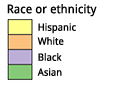 Most of the qualitative schemes rely on differences in hue with only subtle lightness differences between colors. You may pick a subset of colors from a legend with more classes if you are not pleased with the subsets. For example, you could pick four colors from a seven-color legend. Two exceptions to the use of consistent lightness: Paired Scheme: This scheme presents a series of lightness pairs for each hue (e.g. light green and dark green). Use this when you have categories that should be visually related, though they are not explicitly ordered. For example, 'forest' and 'woodland' would be suitably represented with dark and light green.

Color Blender Tool
Cohesive Colors
Basic color schemes
ColorImpact
216 web-safe colorsNote: ADD HEX to overlay for each Web Safe Color Color table 216 web-safe colors
216 web-safe colors EditedNote: MODIFY Web Safe Colors - Color Hex Color Codes
X11 color namesNote: ADD Templates if required (BIG for resizing Text); Note: IDEA Could use this format for other Categories etc. for Colour Background and text
HTML Symbol Codes - Table of Character Entity ReferencesNote: SPLIT into seperate tables and sub sections. Note: Do again mediawiki - Table-Utility (Convert TXT to Table) to add NOWIKI to Entity Number & Entity Name columns
AHeader background colour = #CDEAF9; Border = #CCCCCC <center> {| class="wikitable sortable" |+ style="caption-side:top; color:#e76700;"| ! class="unsortable" |Notes | style="text-align: left; background-color:#FF0000; color:#000000;" | | style="text-align: center; background-color:#FF0000; color:#000000;" |● |} </center> A
AGreek Letters Supported by HTML ACurrency Symbols Supported by HTML AArrow Symbols Supported by HTML AGeneral Punctuation Supported by HTML ALetterlike Symbols Supported by HTML AMiscellaneous Technical Supported by HTML AMiscellaneous Symbols Supported by HTML ALatin Extended-A Supported by HTML ALatin Extended-B Supported by HTML ASpacing Modifier Letters Supported by HTML AGeometric Shapes Supported by HTML A
A
Ideas
A
Template Tests & Code Examples
List of Templates
New To MakeA
A
A
A
Notes
|
|||||||||||||||||||||||||||||||||||||||||||||||||||||||||||||||||||||||||||||||||||||||||||||||||||||||||||||||||||||||||||||||||||||||||||||||||||||||||||||||||||||||||||||||||||||||||||||||||||||||||||||||||||||||||||||||||||||||||||||||||||||||||||||||||||||||||||||||||||||||||||||||||||||||||||||||||||||||||||||||||||||||||||||||||||||||||||||||||||||||||||||||||||||||||||||||||||||||||||||||||||||||||||||||||||||||||||||||||||||||||||||||||||||||||||||||||||||||||||||||||||||||||||||||||||||||||||||||||||||||||||||||||||||||||||||||||||||||||||||||||||||||||||||||||||||||||||||||||||||||||||||||||||||||||||||||||||||||||||||||||||||||||||||||||||||||||||||||||||||||||||||||||||||||||||||||||||||||||||||||||||||||||||||||||||||||||||||||||||||||||||||||||||||||||||||||||||||||||||||||||||||||||||||||||||||||||||||||||||||||||||||||||||||||||||||||||||||||||||||||||||||||||||||||||||||||||||||||||||||||||||||||||||||||||||||||||||||||||||||||||||||||||||||||||||||||||||||||||||||||


