Difference between revisions of "Templates"
m (→Highlighter Colours) |
m (→Highlighter Colours) |
||
| Line 954: | Line 954: | ||
==== Highlighter Colours ==== | ==== Highlighter Colours ==== | ||
| + | '''Note:''' '''<span style="color:#FF0000">ADD</span>''' [[Templates_Colours|Colour Ideas]] | ||
| + | |||
'''Note:''' '''<span style="color:#FF0000">ADD</span>''' a selection of colours for each type, ie. Date, Place Name, Region Name, etc. | '''Note:''' '''<span style="color:#FF0000">ADD</span>''' a selection of colours for each type, ie. Date, Place Name, Region Name, etc. | ||
Latest revision as of 03:13, 27 October 2018
Making a comprehensive list of List of Templates and the various components in relation to them.
Note: ADD proper names and cross-internal links.
Note: ADD list of "special" details to add the various details for extras, ie. saltmarshes of Vashel, under Tamsen Forest.
Note: Text Highlight and Background Colour: Kandáy, Réthem, Thârda, Káldôr, Mèlderýn, Chybísa, Orbáal, Ázadmêre, Eváel.
Note: Green = I Have, Red = Don't Have, Orange = Old Scan, Blue = Misc, Black = ALL Base (Template)
Note: Colour Highlights: Yellow
Colour LINK Text: Possible Link NAME
Note: Hidden comments <!-- TEXT HERE WILL NOT BE DISPLAYED -->
Note: Anchor Points - Section linking WITHIN pages USE [[Help:Section#Section_linking|Section linking]] or To link to a section in the same page you can use [[#section name|displayed text]], and to link to a section in another page [[page name#section name|displayed text]].
Note: Section linking with arbitrary id USE <span id="anchor_name"></span>. Be sure to use a name that is not likely to be duplicated. One way to do this is to incorporate the titles of the higher-level sections, at least in abbreviated form, e.g., Ontario-Natural_features for the "Natural features" subsection of the "Ontario" section of an article about the provinces of Canada.
ADD inside Table Caption/Heaer Text
Contents
- 1 Templates
- 1.1 Anchors
- 1.2 Colours
- 1.2.1 Basic Colour Table
- 1.2.2 Colour Wheel Table
- 1.2.3 Hârn Kingdom Colours
- 1.2.4 Hârn Spine Cover Colours
- 1.2.5 LinkTag RGB Colour Table
- 1.2.6 Highlighter Colours
- 1.2.7 MediaWiki Link Colors
- 1.2.8 Language Families
- 1.2.9 Venârivè Map Key
- 1.2.10 A
- 1.2.11 A
- 1.2.12 A
- 1.2.13 A
- 1.2.14 Standard Kèthîra Table Colours
- 1.2.15 Hues as per Colour
- 1.2.16 ColorBrewer
- 1.2.17 Color Blender Tool
- 1.2.18 Cohesive Colors
- 1.2.19 Basic color schemes
- 1.2.20 ColorImpact
- 1.2.21 216 web-safe colors
- 1.2.22 X11 color names
- 1.2.23 HTML Symbol Codes - Table of Character Entity References
- 1.2.24 A
- 1.2.25 A
- 1.2.26 Ideas
- 1.2.27 A
- 1.3 Template Tests & Code Examples
- 1.4 List of Templates
- 1.5 New To Make
- 2 A
- 3 A
- 4 A
- 5 A
- 6 Notes
Templates
Replace “ ” with "
Replace ‘ ’ with '
Possible Link
INSERT TABLE
Anchors
See: Template:Anchor
Setting Anchors
Note: Generic anchor: some text. For a hidden anchor, omit the "some text".
Manual Anchors
Set your anchor anywhere in the page by using Template:Anchor
Referencing Anchors
Inside a regular wiki link Anchor Link HERE, include the hash sign (#) and the header name or the id tag name as you have written it.
Links of the form #Template_Anchor will link to the first anchor on the page matching that "anchor_name", usually the first identical section heading.
Anchors IDEA
Note: IDEA: Using <span id="anchor_name">Anchor Point Text</span> could setup <span id="COL_REF#_Article_Page#_SectionName">named Anchors</span> where Linked Anchors are composed of it's Name Parts;
- COL = Columbia Games (Fanon = FAN, etc.)
- REF#" = Product Code
- Article = Name of Article/Book
- Page# = Page #
- SectionName = The Chapter or referenced section.
- Page# = Page #
- Article = Name of Article/Book
- REF#" = Product Code
Clade IDEA
Note: IDEA: Using a Clade Template
Categories IDEA
Note: IDEA: Categories are added to a Whole Page, whereas we only need to link to a Category Index. We could create a Category, list all the various parts for a TimeLine within that Category, and put a link for each Date, Settlement, etc. to that Category List. ie. Create a Page for the Main Index, hence creating the Category Index required, then inside their add a table of all the entries for that given Date, Settlement etc. until the Articles and so on are seperated.
Then a Lists of years by topic can be created for each list.
See: Help:Categories
Note: IDEA: Using <span id="anchor_name">Anchor Point Text</span> could setup <span id="COL_REF#_Article_Page#_SectionName">named Anchors</span> where Linked Anchors are composed of it's Name Parts, see above
- List of millennia ~ 1,000 years
- List of centuries ~ 100 years
- List of decades ~ 10 years
- List of years ~ single years
- List of decades ~ 10 years
- List of centuries ~ 100 years
- Saeculum ~ Period of a persons life
- List of time periods ~ Various Types of Periods
Millennium
Viewpoint 1: X001–Y000
| 2 BC | 1 BC | 1 AD | 2 | 3 | 4 | 5 | ... | 998 | 999 | 1000 | 1001 | 1002 | 1003 | ... | 1998 | 1999 | 2000 | 2001 | 2002 | 2003 | ... | 2998 | 2999 | 3000 | 3001 | 3002 | 3003 | ... |
| First one thousand years (millennium) | Second millennium | Third millennium | Fourth millennium | |||||||||||||||||||||||||
Viewpoint 2: X000–X999
| 1 BC | 1 AD | 2 | 3 | 4 | 5 | ... | 998 | 999 | 1000 | 1001 | 1002 | ... | 1998 | 1999 | 2000 | 2001 | 2002 | ... | 2998 | 2999 | 3000 | 3001 | 3002 |
| First millennium | Second millennium | Third millennium | Fourth millennium | ||||||||||||||||||||
Century
Viewpoint 1: Strict usage
| 2 BC | 1 BC | 1 | 2 | 3 | 4 | 5 | ... | 96 | 97 | 98 | 99 | 100 | 101 | 102 | 103 | ... | 198 | 199 | 200 | ... | 1901 | 1902 | ... | 1998 | 1999 | 2000 | 2001 | 2002 | 2003 | ... | 2098 | 2099 | 2100 | 2101 | 2102 | 2103 | ... | 2198 | 2199 | 2200 | |||
| 1st century | 2nd century | ... | 20th century | 21st century | 22nd century | ||||||||||||||||||||||||||||||||||||||
Viewpoint 2: General usage
| 2 BC | 1 BC | 1 | 2 | 3 | 4 | 5 | ... | 96 | 97 | 98 | 99 | 100 | 101 | 102 | 103 | ... | 198 | 199 | ... | 1900 | 1901 | 1902 | ... | 1998 | 1999 | 2000 | 2001 | 2002 | 2003 | ... | 2098 | 2099 | 2100 | 2101 | 2102 | 2103 | ... | 2198 | 2199 |
| 1st century | 2nd century | ... | 20th century | 21st century | 22nd century | ||||||||||||||||||||||||||||||||||
A
A
A
Linking to a category
[[:Category:Help|Help category]]
Anchors TAGs IDEA
Tags would then use Anchors when referenced through the books and interlink the areas together.
Maybe the links on Dates would jump to the Timeline?
Colours should be used on Text as well as the background colours to reflect the TYPE of category it's under, Settlement, Person, and so on
Colours
Note: ADD a range of colours using the following template ideas;
Basic Colour Table
Color Mixer ~ for blending colour to Colour
| Color | HTML / CSS Name | Hex Code #RRGGBB | RGB | Notes |
|---|---|---|---|---|
| Red | #FF0000 | (255, 0, 0) | Primary | |
| Orange | #FF8000 | (255,128,0) | Tertiary | |
| Yellow | #FFFF00 | (255, 255, 0) | Secondary | |
| Chartreuse | #80FF00 | (128, 255, 0) | Tertiary | |
| Lime | #00FF00 | (0, 255, 0) | Primary | |
| Spring Green | #00FF7F | (0, 255, 127) | Tertiary | |
| Cyan / Aqua | #00FFFF | (0, 255, 255) | Secondary | |
| Azure | #007FFF | (0, 127, 255) | Tertiary | |
| Blue | #0000FF | (0, 0, 255) | Primary | |
| Violet or Purple (Electric Indigo) | #8000FF | (128, 0, 255) | Tertiary | |
| Magenta / Fuchsia | #FF00FF | (255, 0, 255) | Secondary | |
| Rose | #FF007F | (255, 0, 128) | Tertiary | |
| Black | #000000 | (0,0,0) | ||
| White | #FFFFFF | (255,255,255) |
- Hues: Pure Colours
- Tints: Hue + White
- Tones: Hue + Grey
- Shades: Hue + Black
- Tones: Hue + Grey
- Tints: Hue + White
- Next between ? & ? are: Primary, Secondary, Tertiary, Quaternary, and Quinary
Colour Wheel Table
INSERT TABLE 5 Columns of colour type, Hex Background Colour & Text Colour, Category (used for), Notes.
- USE Color Mixer to ADD the extra colours between.
- Primary
- Secondary
- Tertiary
- Quaternary
- Quinary
- Quaternary
- Tertiary
- Secondary
Quaternary CMY:
- yellow
- amber
- orange
- vermilion
- yellow
- red
- crimson
- rose
- cerise
- magenta
- purple
- violet
- ultramarine
- blue
- cerulean
- azure
- capri
- cyan
- aquamarine
- spring green
- erin
- green
- harlequin
- chartreuse
- lime
- yellow
quaternary-color
| red | + | orange | = | vermilion (red-orange) | |||
| orange | + | yellow | = | amber (yellow-orange) | |||
| yellow | + | green | = | chartreuse (yellow-green) | |||
| green | + | blue | = | teal (blue-green) | |||
| blue | + | purple | = | violet (blue-purple) | |||
| purple | + | red | = | magenta (red-purple) |
{| |{{Color sample|yellow|yellow}} |- |{{Color sample|#FFBF00|'''amber'''}} |- |{{Color sample|#FF7F00|orange}} |- |{{Color sample|#FF3F00|'''vermilion'''}} |- |{{Color sample|red|red}} |- |{{Color sample|#FF003F|'''crimson'''}} |- |{{Color sample|#FF007F|rose}} |- |{{Color sample|#FF00BF|'''cerise'''}} |- |{{Color sample|magenta|magenta}} |- |{{Color sample|#BF00FF|'''purple'''}} |- |{{Color sample|#7F00FF|violet}} |- |{{Color sample|#3F00FF|'''ultramarine'''}} |- |{{Color sample|blue|blue}} |- |{{Color sample|#003FFF|'''cerulean'''}} |- |{{Color sample|#007FFF|azure}} |- |{{Color sample|#00BFFF|'''capri'''}} |- |{{Color sample|cyan|cyan}} |- |{{Color sample|#00FFBF|'''aquamarine'''}} |- |{{Color sample|#00FF7F|spring green}} |- |{{Color sample|#00FF3F|'''erin'''}} |- |{{Color sample|#00FF00|green}} |- |{{Color sample|#3FFF00|'''harlequin'''}} |- |{{Color sample|#7FFF00|chartreuse}} |- |{{Color sample|#CFFF00|'''lime'''}} |- |{{Color sample|yellow|yellow}}
{| |+'''RYB colors produced by mixing equal amounts of secondary and subsequent colors''' | {| |{{Color sample|#FEFE33|yellow}} |- |{{Color sample|#FF8000|'''orange'''}} |- |{{Color sample|#FE2712|red}} |- |{{Color sample|#800080|'''purple'''}} |- |{{Color sample|#0247FE|blue}} |- |{{Color sample|#66B032|'''green'''}} |- |{{Color sample|#FEFE33|yellow}} |} | {| |{{Color sample|#FF8000|orange}} |- |{{Color sample|#E37D6E|'''russet'''}} |- |{{Color sample|#800080|purple}} |- |{{Color sample|#989B9D|'''slate'''}} |- |{{Color sample|#66B032|green}} |- |{{Color sample|#DDD06A|'''citron'''}} |- |{{Color sample|#FF8000|orange}} |} | {| |{{Color sample|#E37D6E|russet}} |- |{{Color sample|#C2938D|'''plum'''}} |- |{{Color sample|#989B9D|slate}} |- |{{Color sample|#BCB88A|'''sage'''}} |- |{{Color sample|#DDD06A|citron}} |- |{{Color sample|#E0AB76|'''buff'''}} |- |{{Color sample|#E37D6E|russet}} |}
Hârn Kingdom Colours
Note: ADD Table
Note: Text Highlight and Background Colour: Kandáy, Réthem, Thârda, Káldôr, Mèlderýn, Chybísa, Orbáal, Ázadmêre, Eváel.
Hârn Spine Cover Colours
Note: MODIFY the colour codes;
| style="text-align: left; background-color:#FFFFFF; color:#000000;" |
Note: ADD HEX Background & HEX Text Colour Columns
| Spine Cover Colours | ||
|---|---|---|
| Colours | HEX Code | |
| Kandáy | Kandáy | span style="color:#176727" |
| Mèlderýn | Mèlderýn | span style="color:#008179" |
| Chybísa | Chybísa | span style="color:#DA521F |
| Réthem | Réthem | span style="color:#CE6632 |
| Thârda | Thârda | span style="color:#950046 |
| Orbáal | Orbáal | span style="color:#21409A |
| Ázadmêre | Ázadmêre | span style="color:#000000 |
| Eváel | Eváel | span style="color:#B9C21F |
| Káldôr | Káldôr | span style="color:#7A1878 |
| Bestiary | Bestiary | span style="color:#69913D |
| Wilderness | Wilderness | span style="color:#8D3E02 |
| Guilds & Craft | Guilds & Craft | span style="color:#00415F |
| Lore | Lore | span style="color:#B1790C |
| Religion | Religion | span style="color:#A90056 |
| Barbarians | Barbarians | span style="color:#1B492E |
| HârnWorld | HârnWorld | span style="color:#FFFFFF |
| Magic | Magic | span style="color:#C6C8CA" |
| HârnMaster | HârnMaster | span style="color:#58595B" |
| Lýthia | Lýthia | span style="color:#0089CF |
| Adventures | Adventures | span style="color:#551D00 |
| NPCs | NPCs | span style="color:#FFF200 |
| Thonahexus | Thonahexus | span style="color:#F36E21 |
| Atlas Hârnica | Atlas Hârnica | span style="color:#CFB878 |
| ? Heraldry | Heraldry | span style="color:#e76700 |
| ? Location | Location | span style="color:#e76700 |
| ? Symbol (Canon & Fanon) | Symbol (Canon & Fanon) | span style="color:#e76700 |
LinkTag RGB Colour Table
Note: ADD a selection of colours for each type, ie. Date, Place Name, Region Name, etc.
| Color | Hue | HTML / CSS Name | Hex Code #RRGGBB | RGB | Notes |
|---|---|---|---|---|---|
| 0 / 360 | Red | #FF0000 | (255, 0, 0) | ADD, Notes, and other "TO LOOK AT" | |
| 15 | #FF4000 | (255, 64, 0) | |||
| 30 | Orange | #FF8000 | (255,128,0) | ||
| 45 | #FFBF00 | (255, 191, 0) | |||
| 60 | Yellow | #FFFF00 | (255, 255, 0) | Use Daffodil instead, reserved for Highlighting | |
| Daffodil (Highlight) | #FCFF19 | (252, 255, 25) | Highlighter Yellow | ||
| 75 | #BFFF00 | (191, 255, 0) | |||
| 90 | #80FF00 | (128, 255, 0) | |||
| 105 | #40FF00 | (64, 255, 0) | |||
| 120 | Lime | #00FF00 | (0, 255, 0) | ||
| 135 | #00FF40 | (0, 255, 64) | |||
| 150 | #00FF80 | (0, 255, 128) | |||
| 165 | #00FFBF | (0, 255, 191) | |||
| 180 | Cyan / Aqua | #00FFFF | (0, 255, 255) | ||
| 195 | #00BFFF | (0, 191, 255) | |||
| 210 | #0080FF | (0, 128, 255) | |||
| Sea Blue (Possible Link) | #006699 | (0, 102, 153) | Possible Link (for possible links) | ||
| 225 | #0040FF | (0, 64, 255) | |||
| 240 | Blue | #0000FF | (0, 0, 255) | ||
| 255 | #4000FF | (64, 0, 255) | |||
| 270 | Violet or Purple (Electric Indigo) | #8000FF | (128, 0, 255) | ||
| 285 | #BF00FF | (191, 0, 255) | |||
| 300 | Magenta / Fuchsia | #FF00FF | (255, 0, 255) | ||
| 315 | #FF00BF | (255, 0, 191) | |||
| 330 | #FF0080 | (255, 0, 128) | |||
| 345 | #FF0040 | (255, 0, 64) | |||
| Black | #000000 | (0,0,0) | |||
| White | #FFFFFF | (255,255,255) | Blank Entries |
Highlighter Colours
Note: ADD Colour Ideas
Note: ADD a selection of colours for each type, ie. Date, Place Name, Region Name, etc.
Note: ADD Highlight Colours to show the Date (bt / tr), Kingdom /Region, Tribe / People / Person, Culture / Language / Dialect, Sourcebook / Reference, Event, Guilds & Crafts, Religion, Location, Highlight interesting snippet
| Color | Colour Name | Type | HEX | Notes |
|---|---|---|---|---|
| Yellow | Primary | #FFFF00 | ||
| Golden Yellow | Quaternary | #FFDF00 | ||
| Amber | Tertiary | #FFBF00 | ||
| Orange Peel | Quaternary | #FF9F00 | ||
| Orange | Secondary | #FF8000 | ||
| Persimmon | Quaternary | #EC5800 | ||
| Vermilion | Tertiary | #E34234 | ||
| Scarlet | Quaternary | #FF3300 | ||
| Red | Primary | #FF0000 | ||
| Crimson | Quaternary | #DC143C | ||
| Magenta | Tertiary | #FF00FF | ||
| Aubergine | Quaternary | #94006C | ||
| Purple | Secondary | #800080 | ||
| Amethyst | Quaternary | #691A87 | ||
| Violet | Tertiary | #7F00FF | ||
| Indigo | Quaternary | #4123BF | ||
| Blue | Primary | #0000FF | ||
| Cerulean | Quaternary | #007BA7 | ||
| Teal | Tertiary | #008080 | ||
| Viridian | Quaternary | #079D43 | ||
| Green | Secondary | #00FF00 | ||
| Apple Green | Quaternary | #8CC433 | ||
| Chartreuse | Tertiary | #7FFF00 | ||
| Lemon Lime | Quaternary | #D8F208 | ||
| Yellow | Primary | #FFFF00 |
Blue Green Pink Orange Yellow Red Torquoise Lavender Lilac
| Color | Colour Name | Hex Code #RRGGBB | RGB | Notes |
|---|---|---|---|---|
| yellow 70/24 | #F1E740 | (0, 0, 0) | #FFFF00 | |
| blue 70/31 | #3AAFDC | (0, 0, 0) | #00FFFF | |
| green 70/33 | #2BA727 | (0, 0, 0) | #00FF00 | |
| pink 70/56 | #EA5A79 | (0, 0, 0) | ? #FF69B4 or #FF1493 ? | |
| orange 70/54 | #F39539 | (0, 0, 0) | #FF8000 | |
| red 70/40 | #E94F58 | (0, 0, 0) | ||
| torquoise 70/51 | #009E6C | (0, 0, 0) | ||
| lavender 70/55 | #85569C | (0, 0, 0) | ||
| lilac 70/58 | #D72E83 | (0, 0, 0) |
- STABILO BOSS ORIGINAL www.stabilo.co.uk
MediaWiki Link Colors
INSERT TABLE
- blue link
- dark blue link
- red link
- light brown link
- brown link
- light blue link
- purple link
| Link style | Type | Color | Color |
|---|---|---|---|
| blue link | link to a page that currently exists | #0645AD = rgb(6,69,173) | |
| dark blue link | link to a page that you have already visited | #0B0080 = rgb(11,0,128) | |
| red link | link to a page that does not currently exist within Wikipedia | #CC2200 = rgb(204,34,0) | |
| light brown link | link to a page that does not exist, but you have visited | #A55858 = rgb(165,88,88) | |
| brown link | link to a very short article within Wikipedia, but only if the user has set a preference option to format "stub" links in this way | #772233 = rgb(119,34,51) | |
| light blue link | link to a page at another wiki, usually another Wikimedia project Note that the light blue color is used whether or not the page actually exists at the target wiki. For example, there is an article about Washington Carver here on the English Wikipedia, while there is article of the same name on the Japanese Wikipedia; but they do have article about the same man under a different title. The same color is used for links, as well. |
#3366BB = rgb(51,102,187) | |
| purple link | link to a page at another site that has been visited | #663366 = rgb(102,51,102) |
Language Families
INSERT TABLE from Kèthîra Language Families
- Járind Family
- Phâric Family
- Azéri (or Venârian) Family
- Anzélan Family
- Mafáni Family
- Molkûran Family
- Reshéni Family
- Ketâric Family
- Númec Family
- Kámadh Family
- Mêrnáti Family
- A title Dialect
Venârivè Map Key
INSERT TABLE
- Venârivè P234
- Climate Zones
- Subpolar
- Cool Temperate
- Warm Temperate
- Subtropical
- Tropical (Dry)
- Tropical (Wet)
- Precipitation Levels (Colours & Symbols)
- < 10 inches p.a.
- 10-20 inches p.a.
- 20-40 inches p.a.
- 40-80 inches p.a.
- 80+ inches p.a
- Vegetation and Geography
- Evergreen Hardwood
- Steppe / Prairie Grassland
- Savannah / Savannah Woodland
- Raingreen Forest / Woodland
- Tropical Scrub
- Semi-Desert
- Desert
- Sub-Tropical Rainforest
- Tropical and Equatorial Rainforest
- Mixed Woodland
- Mixed (Summergreen) Forest
- Needleleaf Forest
- Alpine
- Mountains (2 Colours)
- Highlands / Hills (2 Colours)
- Water
- Swamp / Marsh
- Features (Symbols & Coloured Lines)
- Major Town / City
- Local Town
- Special Site (Earthmaster etc)
- The Shurâma
- Volcano
- Undersea Volcano
- Border
- Provincial (Internal) Border
- Road
- Trail
- Trade Route
- Winds, Currents, Tides, and Tectonics
- Prevailing Winds
- Seasonal Winds
- Ocean Currents
- Tide Lines and Factors
- Plate Boundary
- Earthquake Zone
- A
- A
A
INSERT TABLE
- A
A
INSERT TABLE
- A
A
INSERT TABLE
- A
A
INSERT TABLE
- A
- For Hues as per colour chosen: [colors picker]
- For Tint, Tones, & Shades as per colour chosen: colors picker
- Other information: colorhexa
Standard Kèthîra Table Colours
Data Tables
| Continent | Square Leagues | Square Kilometres | Square Miles |
|---|---|---|---|
| Lýthia | 3,375,000 | 54,000,000 | 21,000,000 |
| Mêrnat | 1,250,000 | 20,000,000 | 8,000,000 |
| Kámerand | 1,125,000 | 18,000,000 | 7,000,000 |
Alternative Data Tables
| Zodiac | |
|---|---|
| Áhnù | the dragon |
| Angberélius | the swords |
| Arálius | the wands |
| Fenéri | the smith |
| Ládo | the galley |
| Ùlándus | the bear |
| Hîrin | the eagle |
| Masâra | the chalice |
| Nadái | the salamander |
| Skôrus | the mixer |
| Tai | the lantern bearer |
| Táraèl | the pentacle |
Hues as per Colour
| Colour | Hue | HTML / CSS Name | Hex Code #RRGGBB | RGB | Notes |
|---|---|---|---|---|---|
| 0 | #FF0000 | (255, 0, 0) | |||
| 15 | #FF4000 | (255, 64, 0) | |||
| 30 | #FF8000 | (255, 128, 0) | |||
| 45 | #FFBF00 | (255, 191, 0) | |||
| 60 | #FFFF00 | (255, 255, 0) | |||
| 75 | #BFFF00 | (191, 255, 0) | |||
| 90 | #80FF00 | (128, 255, 0) | |||
| 105 | #40FF00 | (64, 255, 0) | |||
| 120 | #00FF00 | (0, 255, 0) | |||
| 135 | #00FF40 | (0, 255, 64) | |||
| 150 | #00FF80 | (0, 255, 128) | |||
| 165 | #00FFBF | (0, 255, 191) | |||
| 180 | #00FFFF | (0, 255, 255) | |||
| 195 | #00BFFF | (0, 191, 255) | |||
| 210 | #0080FF | (0, 128, 255) | |||
| 225 | #0040FF | (0, 64, 255) | |||
| 240 | #0000FF | (0, 0, 255) | |||
| 255 | #4000FF | (64, 0, 255) | |||
| 270 | #8000FF | (128, 0, 255) | |||
| 285 | #BF00FF | (191, 0, 255) | |||
| 300 | #FF00FF | (255, 0, 255) | |||
| 315 | #FF00BF | (255, 0, 191) | |||
| 330 | #FF0080 | (255, 0, 128) | |||
| 345 | #FF0040 | (255, 0, 64) | |||
| 360 | #FF0000 | (255, 0, 0) |
Note: Highlight ALL key Languages and Tribes;
ADD ACTUAL names rather than plain English.
Colour Sample Template
Note: USE COLOUR Template and SETUP a subtemplate for each Tribe, Language, Dialect Group, Settlement, etc. Can then Invoke the template/name to use Background and text colour.
{{Color sample|#00FF00|description=green}}
ColorBrewer
ColorBrewer: Color Advice for Maps
Number of data classes
Choosing the number of data classes (3 to 12) is an important part of map design. Increasing the number of data classes will result in a more "information rich" map by decreasing the amount of data generalization. However, too many data classes may overwhelm the map reader with information and distract them from seeing general trends in the distribution. In addition, a large numbers of classes may compromise map legibility—more classes require more colors that become increasingly difficult to tell apart.
Many cartographers advise that you use five to seven classes for a choropleth map. Isoline maps, or choropleth maps with very regular spatial patterns, can safely use more data classes because similar colors are seen next to each other, making them easier to distinguish.
Nature of your data
1. Sequential schemes (9 Colours) are suited to ordered data that progress from low to high. Lightness steps dominate the look of these schemes, with light colors for low data values to dark colors for high data values.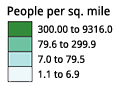
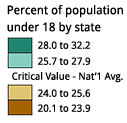

NOTE: Although we have designed the diverging schemes to be symmetrical, you may need to customize schemes by moving the critical break/class closer to one end of the sequence to suit your map data. For example, a map of population change might have two classes of population loss and five classes of growth, requiring a scheme with only two colors on one side of a zero-change break and five on the other. Choose a scheme with ten-colors and omit three colors from the loss side of the scheme.
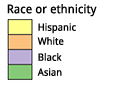
Most of the qualitative schemes rely on differences in hue with only subtle lightness differences between colors. You may pick a subset of colors from a legend with more classes if you are not pleased with the subsets. For example, you could pick four colors from a seven-color legend. Two exceptions to the use of consistent lightness:
Paired Scheme: This scheme presents a series of lightness pairs for each hue (e.g. light green and dark green). Use this when you have categories that should be visually related, though they are not explicitly ordered. For example, 'forest' and 'woodland' would be suitably represented with dark and light green.

NOTE: ADD A list and groups of the various colour combos.
Color Blender Tool
- Color Blender Tool - Mix Colors ~ Best for a certain Colour, then use other tools to blend for the variantions.
- #0073ae hex color
- #7a1878 hex color
- Monochromatic Color (7 Colours)
- Alternatives to #7a1878 (7 Similar Colours)
- #7a1878 Preview (Text with hexadecimal color #7a1878, #7a1878 background color, #7a1878 border color, & CSS codes)
- Text here
-
Content here
- Content here
- .text {color:#7a1878;}, .background {background-color:#7a1878;}, .border {border:1px solid #7a1878;}
- Shades and Tints of #7a1878 (13 Shade Color Variations & 13 Tint Color Variations)
- Tones of #7a1878 (13 Tone Color Variations)
- Gradient generator ~ Generate any gradient between two colors. Just type your colors separated by the word "to" in the search field. ColorHexa will then display a RGB, HSV and Reverse HSV gradient.
- Color blender ~ Blend as much colors as you want. Just type your colors separated by the symbol "+" in the search field. ColorHexa will then compute the result automatically and return the color corresponding to your query.
- Color subtraction ~ Substract as much colors as you want. Just type your colors separated by the symbol "-" in the search field. ColorHexa will then compute the result automatically and return the color corresponding to your query.
Cohesive Colors
- Cohesive Colors A tool for creating more cohesive color schemes. Idea Can use to generate multiple Colours, then do an overlay Tint of X colour to generate and output.
Basic color schemes
- Basic color schemes: Color Theory Introduction ~ Good Idea of boxes and how to make Colour Boxes
- Tints - adding white to a pure hue
- Shades - adding black to a pure hue
- Tones - adding gray to a pure hue
Note: NEED a tool that can take two colours and then create a blend between them. Others might be good when creating the various complimentary colour sets for the various maps and their data colour sets.
ColorImpact
- ColorImpact: Features shows Variation palette;
- Explore variations of the current color palette. See how your color scheme would look if you make the colors lighter, brighter, darker, more saturated, less saturated, warmer or cooler.
- Sample Sheet ~ Color Spec Sheet as html
- ColorBlender.com online color matching toolbox ~ 6 Blends of Colours
- Sphere: Color Theory Visualizer ~ 10 Harmony Variations (upto six tones)
 |
216 web-safe colors
Note: ADD HEX to overlay for each Web Safe Color
Color table 216 web-safe colors
216 web-safe colors Edited
Note: MODIFY Web Safe Colors - Color Hex Color Codes
| 000000 | 330000 | 660000 | 990000 | CC0000 | FF0000 |
| 000033 | 330033 | 660033 | 990033 | CC0033 | FF0033 |
| 000066 | 330066 | 660066 | 990066 | CC0066 | FF0066 |
| 000099 | 330099 | 660099 | 990099 | CC0099 | FF0099 |
| 0000CC | 3300CC | 6600CC | 9900CC | CC00CC | FF00CC |
| 0000FF | 3300FF | 6600FF | 9900FF | CC00FF | FF00FF |
| 003300 | 333300 | 663300 | 993300 | CC3300 | FF3300 |
| 003333 | 333333 | 663333 | 993333 | CC3333 | FF3333 |
| 003366 | 333366 | 663366 | 993366 | CC3366 | FF3366 |
| 003399 | 333399 | 663399 | 993399 | CC3399 | FF3399 |
| 0033CC | 3333CC | 6633CC | 9933CC | CC33CC | FF33CC |
| 0033FF | 3333FF | 6633FF | 9933FF | CC33FF | FF33FF |
| 006600 | 336600 | 666600 | 996600 | CC6600 | FF6600 |
| 006633 | 336633 | 666633 | 996633 | CC6633 | FF6633 |
| 006666 | 336666 | 666666 | 996666 | CC6666 | FF6666 |
| 006699 | 336699 | 666699 | 996699 | CC6699 | FF6699 |
| 0066CC | 3366CC | 6666CC | 9966CC | CC66CC | FF66CC |
| 0066FF | 3366FF | 6666FF | 9966FF | CC66FF | FF66FF |
| 009900 | 339900 | 669900 | 999900 | CC9900 | FF9900 |
| 009933 | 339933 | 669933 | 999933 | CC9933 | FF9933 |
| 009966 | 339966 | 669966 | 999966 | CC9966 | FF9966 |
| 009999 | 339999 | 669999 | 999999 | CC9999 | FF9999 |
| 0099CC | 3399CC | 6699CC | 9999CC | CC99CC | FF99CC |
| 0099FF | 3399FF | 6699FF | 9999FF | CC99FF | FF99FF |
| 00CC00 | 33CC00 | 66CC00 | 99CC00 | CCCC00 | FFCC00 |
| 00CC33 | 33CC33 | 66CC33 | 99CC33 | CCCC33 | FFCC33 |
| 00CC66 | 33CC66 | 66CC66 | 99CC66 | CCCC66 | FFCC66 |
| 00CC99 | 33CC99 | 66CC99 | 99CC99 | CCCC99 | FFCC99 |
| 00CCCC | 33CCCC | 66CCCC | 99CCCC | CCCCCC | FFCCCC |
| 00CCFF | 33CCFF | 66CCFF | 99CCFF | CCCCFF | FFCCFF |
| 00FF00 | 33FF00 | 66FF00 | 99FF00 | CCFF00 | FFFF00 |
| 00FF33 | 33FF33 | 66FF33 | 99FF33 | CCFF33 | FFFF33 |
| 00FF66 | 33FF66 | 66FF66 | 99FF66 | CCFF66 | FFFF66 |
| 00FF99 | 33FF99 | 66FF99 | 99FF99 | CCFF99 | FFFF99 |
| 00FFCC | 33FFCC | 66FFCC | 99FFCC | CCFFCC | FFFFCC |
| 00FFFF | 33FFFF | 66FFFF | 99FFFF | CCFFFF | FFFFFF |
X11 color names
Note: ADD Templates if required (BIG for resizing Text);
Note: IDEA Could use this format for other Categories etc. for Colour Background and text
|
|
| ||||||||||||||||||||||||||||||||||||||||||||||||||||||||||||||||||||||||||||||||||||||||||||||||||||||||||||||||||||||||||||||||||||||||||||||||||||||||||||||||||||||||||||||||||||||||||||||||||||||||||||||||||||||||||||||||||||||||||||||||||||||||||||||||||||||||||||||||||||||||||||||||||||||||||||||||||||||||||||||||||||||||||||||||||||||||||||||||||||||||||||||||||||||||||||||||||||||||||||||||||||||||||||||||||||||||||||||||||||||||||||||||||||||||||||||||||||
HTML Symbol Codes - Table of Character Entity References
Note: SPLIT into seperate tables and sub sections.
Note: Do again mediawiki - Table-Utility (Convert TXT to Table) to add NOWIKI to Entity Number & Entity Name columns
- Mathematical Symbols Supported by HTML
- Greek Letters Supported by HTML
- Currency Symbols Supported by HTML
- Arrow Symbols Supported by HTML
- General Punctuation Supported by HTML
- Letterlike Symbols Supported by HTML
- Miscellaneous Technical Supported by HTML
- Miscellaneous Symbols Supported by HTML
- Latin Extended-A Supported by HTML
- Latin Extended-B Supported by HTML
- Spacing Modifier Letters Supported by HTML
- Geometric Shapes Supported by HTML
A
Header background colour = #CDEAF9;
Border = #CCCCCC
<center> {| class="wikitable sortable" |+ style="caption-side:top; color:#e76700;"| ! class="unsortable" |Notes
| style="text-align: left; background-color:#FF0000; color:#000000;" | | style="text-align: center; background-color:#FF0000; color:#000000;" |●
|} </center>
A
| Character | Entity Number | Entity Name | Description |
|---|---|---|---|
| ∀ | ∀ | ∀ | for all |
| ∂ | ∂ | ∂ | partial differential |
| ∃ | ∃ | ∂ | there exists |
| ∅ | ∅ | ∅ | empty set |
| ∇ | ∇ | ∇ | nabla |
| ∈ | ∈ | ∈ | element of |
| ∉ | ∉ | ∉ | not an element of |
| ∋ | ∋ | ∋ | contains as member |
| ∏ | ∏ | ∏ | n-ary product |
| ∑ | ∑ | ∑; | n-ary sumation |
| − | − | − | minus sign |
| ∗ | ∗ | ∗ | asterisk operator |
| √ | √ | √ | square root |
| ∝ | ∝ | ∝ | proportional to |
| ∞ | ∞ | ∞ | infinity |
| ∠ | ∠ | ∠ | angle |
| ∧ | ∧ | ∧ | logical and = wedge |
| ∨ | ∨ | ∨ | logical or = vee |
| ∩ | ∩ | ∩ | intersection = cap |
| ∪ | ∪ | ∪ | union = cup |
| ∫ | ∫ | ∫ | integral |
| ∴ | ∴ | ∴ | therefore |
| ∼ | ∼ | ∼ | tilde operator = varies with = similar to |
| ≅ | ≅ | ≅ | approximately equal to |
| ≈ | ≈ | ≈ | almost equal to = asymptotic to |
| ≠ | ≠ | ≠ | not equal to |
| ≡ | ≡ | ≡ | identical to |
| ≤ | ≤ | ≤ | less-than or equal to |
| ≥ | ≥ | ≥ | greater-than or equal to |
| ⊂ | ⊂ | ⊂; | subset of |
| ⊃ | ⊃ | ⊃ | superset of |
| ⊄ | ⊄ | ⊄ | not a subset of |
| ⊆ | ⊆ | ⊆ | subset of or equal to |
| ⊇ | ⊇ | ⊇ | superset of or equal to |
| ⊕ | ⊕ | ⊕ | circled plus = direct sum |
| ⊗ | ⊗ | ⊗ | circled times = vector product |
| ⊥ | ⊥ | ⊥ | up tack = orthogonal to = perpendicular |
| ⋅ | ⋅ | ⋅ | dot operator |
A
Greek Letters Supported by HTML
A
Currency Symbols Supported by HTML
A
Arrow Symbols Supported by HTML
A
General Punctuation Supported by HTML
A
Letterlike Symbols Supported by HTML
A
Miscellaneous Technical Supported by HTML
A
Miscellaneous Symbols Supported by HTML
A
Latin Extended-A Supported by HTML
A
Latin Extended-B Supported by HTML
A
Spacing Modifier Letters Supported by HTML
A
Geometric Shapes Supported by HTML
A
- A
- A
A
- A
- A
Ideas
- Ideas
- Template Examples
- Layout & Structure
A
- a
- a
Template Tests & Code Examples
- a
- a
- a
- a
List of Templates
- Templates
- Tables
- Ancestry Boxstyle
- Ancestry Chart
- Chivalry
- Icons ~ German Anno 1404 wiki page
- Tables
New To Make
A
- A
- A
A
- A
- A
A
- A
- A
A
- A
- A
Notes
- A
- A

